
Business Systems for Coaches: Start Small Without Corporate Complexity

When people talk about business systems, the phrase can sound heavier than the work needs to be. It may bring to mind complicated software, thick procedure manuals or a large organisation with a process for everything.
That is not where an established coaching practice needs to begin.
A useful system can be much smaller. It can make one repeated task easier to see, complete and review. The aim is not to turn thoughtful client work into a production line. It is to give necessary business work enough structure that it does not have to be rebuilt from memory every time.
This matters because client flow is shaped by more than marketing alone. It sits inside the connected system around client flow: how people understand the offer, what happens after an enquiry, how the service is delivered and what the owner can realistically support.
What a business system means in an established coaching practice
A repeatable, reviewable way to complete necessary work
Here, a business system means a repeatable and reviewable way to complete necessary work. It can be a short checklist, document or table; software or automation is not required.
The important parts are visibility and usefulness. Someone should be able to see what begins the work, what needs to happen, who is currently responsible and what a completed result looks like. The process should also be easy enough to review after real use.
For a solo coach, “who is responsible” may simply mean the owner wearing a particular hat at that moment. In a small practice, it may clarify where one person finishes and another begins. The system does not create a job title or a reporting line. It records how the work is currently handled.
Why a system is not the same as software
Software can support a process, but it cannot decide what the process should be.
If the steps are unclear, moving them into a new platform can preserve the confusion in a more expensive form. If the steps are already simple and reliable, a checklist or short document may be enough.
Start by understanding the work. Choose a tool only when it solves a clear problem in that work. This keeps the practice from accumulating platforms that need attention without improving the underlying handoff.
Start with one high-friction repeated process
Observable prompts: repeated recreation, unclear handoff or information held only in memory
Look for a task that happens often enough to matter and currently depends too much on memory. You might notice that:
- the same email or document is recreated each time;
- a routine task waits because the next person is unclear;
- an exception is handled differently on every occasion;
- useful information sits in one person’s head; or
- the work is completed, but nobody can easily tell whether it is finished.
These are prompts for examination, not a diagnosis. A repeated inconvenience does not automatically mean the whole practice needs a new operating system. It may point to one small area where clearer information would help.
The broader client-flow context matters too. Systems and owner capacity can shape client flow, but that relationship is not proof that a particular process caused an enquiry pattern or that documenting it will create a commercial outcome.
Choose a bounded process without systemising everything
Choose a process with a clear beginning and end. A bounded task is easier to understand than an entire category such as “marketing,” “onboarding” or “administration.”
For example, you might examine the internal steps used to prepare a standard non-client-identifying resource, review a routine website update before it is published, or close out a completed administrative task. Keep the example generic. Do not copy client names, contact details, health information, session notes, financial records or other identifying material into a working process example.
A good starting process is visible enough to test and small enough to change without disrupting the practice. You are not committing to systemising every part of the business. You are learning what level of structure is useful.
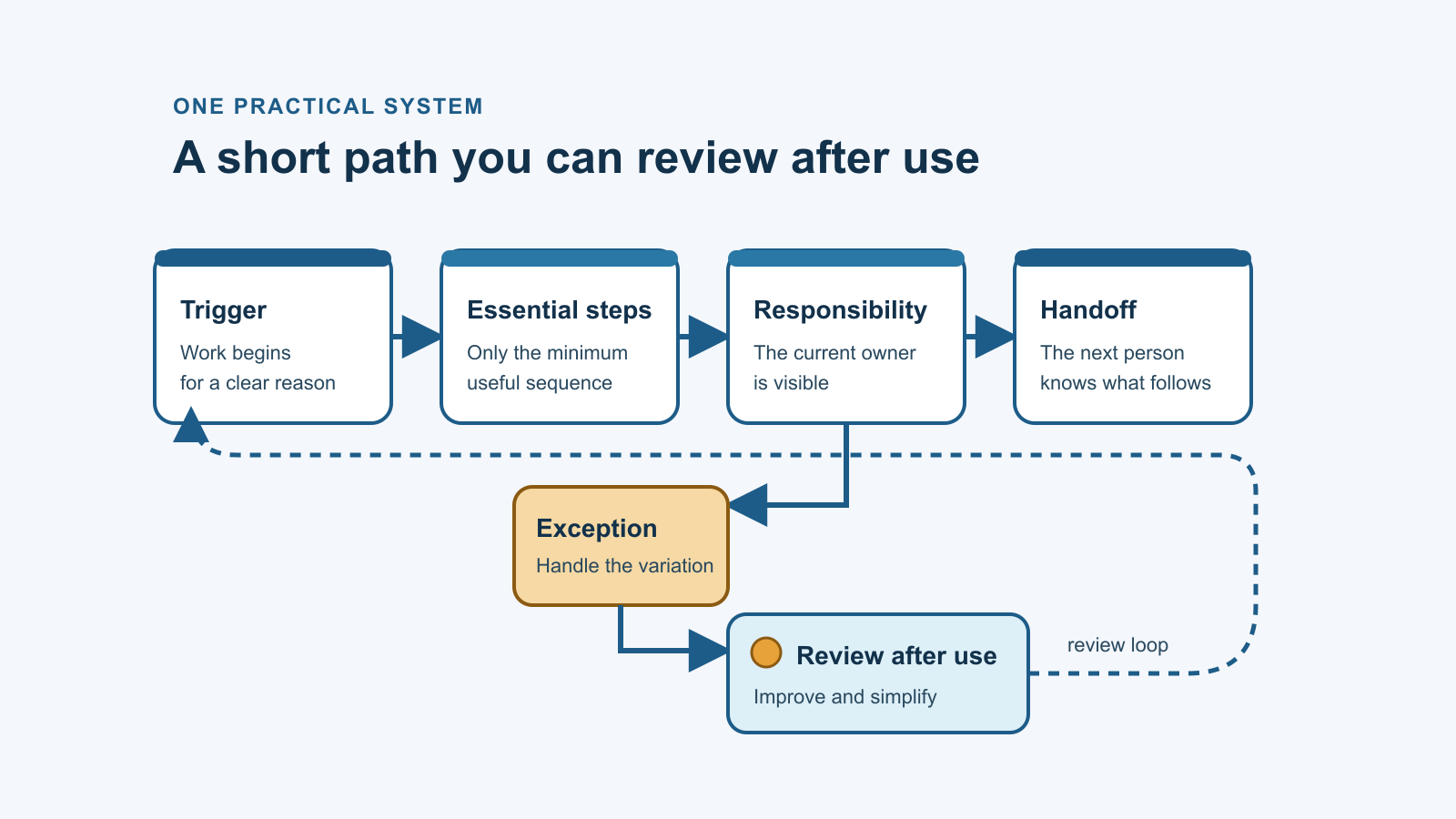
Capture the minimum useful system
Trigger and intended outcome
Begin with two plain-language questions:
What starts this work? The trigger may be a routine request, a planned review or the completion of an earlier task.
What should be true when it is finished? Describe the intended outcome in observable terms. Avoid broad aims such as “make it better.” State what should exist, what should be checked or what should be ready for the next person.
These two points stop a checklist from becoming a loose list of activity. They connect the steps to a defined purpose.
Steps and the person currently responsible
Write only the steps needed to complete the work. Use a verb at the start of each step so the action is clear. Put them in the order they normally happen.
Beside each step, note the person currently responsible. “Responsible” describes who performs or coordinates that step today. It does not appoint anyone, change authority or decide who should hold the responsibility in future.
If the same person completes every step, the note can still be useful. It separates different kinds of work and makes a future handoff easier to assess.
Handoff and exception
Identify the point where the work moves to someone else or waits for a decision. State what the receiver needs, what “ready” means and what remains outside their authority.
Then record the most common exception. The goal is not to anticipate every possibility. It is to prevent the process from failing the first time something ordinary does not fit the standard path.
An exception may simply say: pause, preserve the information already gathered and ask the appropriate owner before proceeding. That can be more useful than adding many conditional steps.
Choose the lightest workable format
When a checklist, short document or simple table is enough
Match the format to the work.
A checklist can suit a short sequence where the order matters. A document can explain judgement, definitions or an exception that needs context. A simple table can show a repeated handoff, current responsibility and status at a glance.
Use the smallest format that keeps the work understandable. A larger template is not automatically more robust. Extra fields create maintenance work, and people may stop using a system that asks for information they do not need.
Let tools support the process rather than define it
A tool should help people follow or review the process. It should not force the practice into a workflow simply because the feature exists.
Before adding software, ask what problem the tool would solve. Is the difficulty caused by missing information, unclear responsibility, an inconsistent handoff or genuine repetition that a tool could support? If the answer is unclear, keep the process visible in a simpler form and learn from real use first.
There is no universal tool or format for a coaching practice. The right choice depends on the work, the people involved, the information being handled and the practice’s current capacity.
Review the system after real use
Notice what remained unclear
Use the system in the course of ordinary work, then review what actually happened.
Notice where the instructions were unclear, where information was missing or where the process required an unrecorded decision. Also notice which parts were unnecessary. A step that sounded sensible while drafting may add nothing in practice.
Treat this as observation, not proof that the system improved performance. The first version is a way to make the work reviewable.
Remove unnecessary steps before adding complexity
When something does not work, it is tempting to add fields, approvals or tools. First ask whether a step can be removed, combined or explained more clearly.
The aim is not to produce the most detailed process. It is to preserve the information and judgement the task genuinely needs. The useful question is whether each step and handoff remains understandable in real use; the system's size does not prove a particular operational or commercial result.
One small next step
Choose one repeated task and write down the minimum information needed to complete it consistently
Pick one repeated task with a clear beginning and end. Write down its trigger, intended outcome, essential steps, current responsibility, handoff and most common exception. Choose a checklist, short document or simple table—whichever makes the work easiest to see.
Then use it and review it. Keep what proves useful. Remove what does not.
Documenting one process is a reflective step, not proof of improvement. Its immediate value is that the work is no longer entirely invisible, which gives you something concrete to examine.
Take the 19-question Client Flow Snapshot for an immediate on-screen directional view of six connected areas. The form does not require your name, email address, client information or financial figures. It does not establish root cause or tell you that a particular solution is required.